
Download NWIQ Retail Inventory POS Software – POS software, retail inventory management, billing software, one-time purchase, small business tools, mobile POS, GST ready
Overview
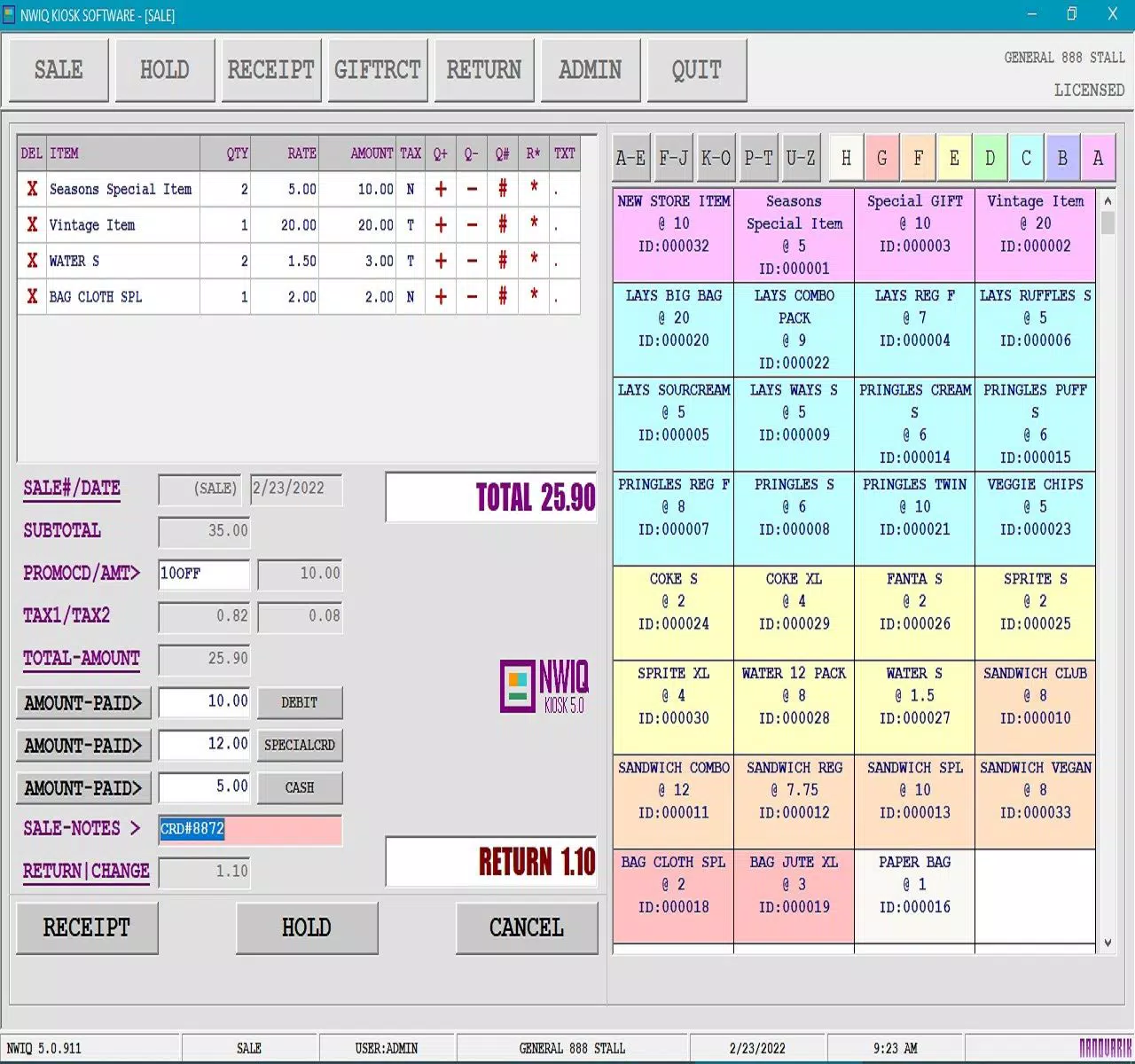
NWIQ Retail Inventory POS Software is a mobile solution tailored for small-scale retailers, including street vendors, food vans, and temporary stalls. Designed with simplicity and affordability in mind, it offers a complete billing and inventory management system without recurring subscription fees. The app enables users to process sales, track stock levels, generate receipts, and manage financial data efficiently—all from a single interface. Its primary purpose is to streamline daily operations for businesses with limited resources, reducing manual errors and improving transaction speed.
Target users include micro-entrepreneurs, mobile vendors, and small shop owners who need a reliable, low-cost tool to manage their retail activities. The software addresses common pain points such as inefficient record-keeping, lack of compliance with tax regulations, and high operational costs associated with traditional POS systems. By offering a one-time purchase model, it removes the burden of ongoing payments, making it especially appealing for budget-conscious business owners.
Although the developer did not provide additional background on NWIQ, the app’s focus on core retail functions suggests a targeted development approach. Real-world use cases include managing daily sales at a food cart, tracking inventory for a small kiosk, or generating compliant receipts for a local market stall. In the broader app ecosystem, NWIQ fills a niche for lightweight, cost-effective tools that empower small businesses to operate more professionally without relying on expensive enterprise systems.
Key Features & Functionality
- One-Time Purchase Model – Unlike subscription-based POS systems, NWIQ requires no recurring fees. This allows small business owners to manage their budgets more predictably and avoid long-term financial commitments.
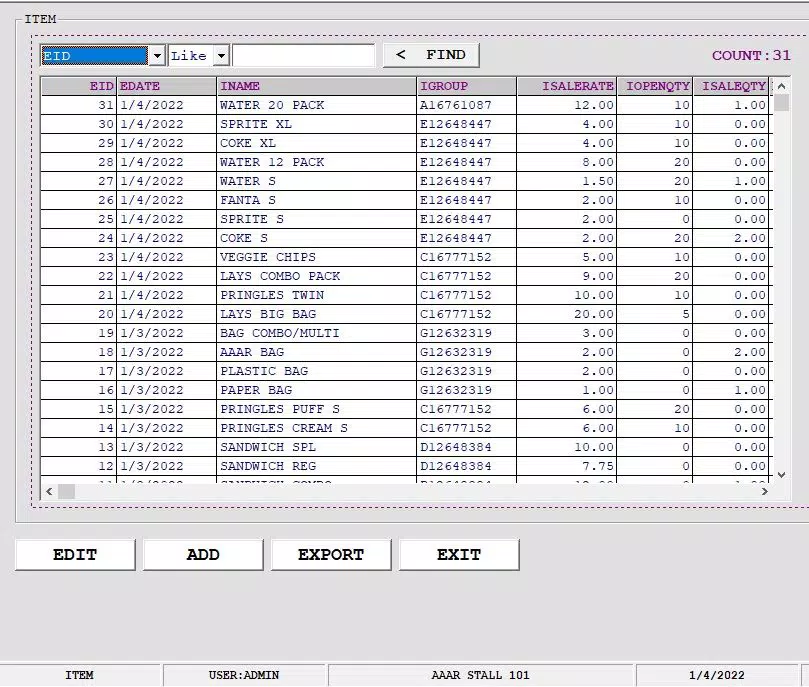
- 55 Built-in Functions – The software includes a comprehensive suite of tools covering sales processing, inventory tracking, receipt generation, payment type management, and promotional handling.
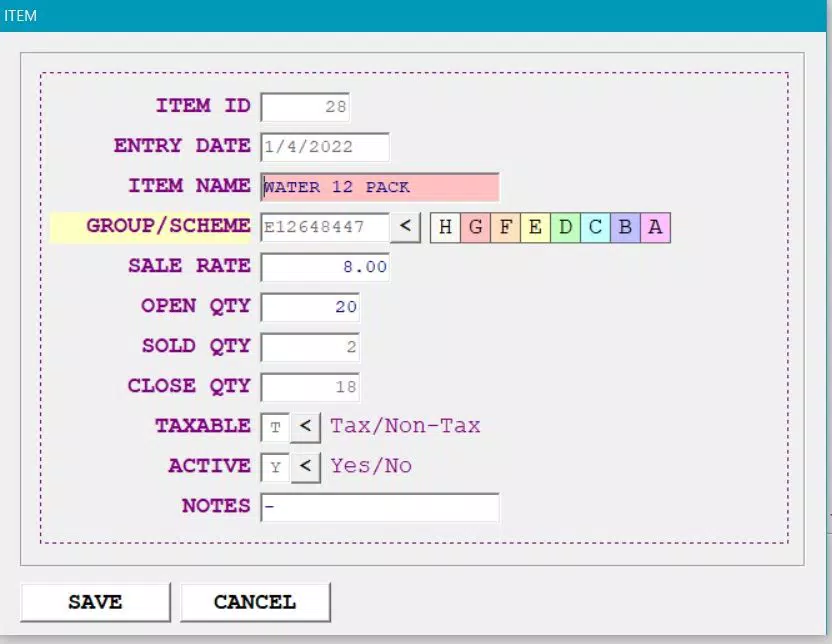
- Quick Setup and Intuitive UI – Users can configure their store profile, product list, and payment methods in minutes. The interface is designed to be accessible even for those with minimal technical experience.
- Flexible Reporting Tools – The app generates daily sales summaries, user-specific sales reports, and payment-type breakdowns. Reports can be printed or saved for record-keeping and business analysis.
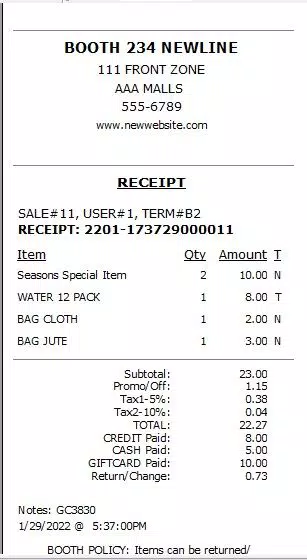
- Full GST Compliance – The software is designed to support Goods and Services Tax requirements, helping retailers generate tax-compliant invoices and maintain accurate financial records.
- Mobile-First Design – Built for Android, the app is optimized for use on smartphones and tablets, making it ideal for on-the-go retailers who need a portable solution.
For example, a food van operator can quickly add new menu items, record each sale with a single tap, and generate a GST-compliant receipt instantly. A small retail stall owner can monitor stock levels in real time and receive alerts when inventory runs low. These features translate into tangible benefits: faster transactions, reduced manual work, and improved compliance with tax laws.
Interface, UX & Performance
The user interface of NWIQ Retail Inventory POS Software is clean and focused on core tasks, minimizing visual clutter. Navigation is straightforward, with a central dashboard providing quick access to sales, inventory, and reporting functions. The layout prioritizes usability, placing frequently used tools within easy reach of the user.
Visual design is minimalistic, relying on clear typography and consistent color coding to differentiate between actions and statuses. Buttons are appropriately sized for touch interaction, and menus respond promptly to taps. The app maintains a stable performance across different device categories, although the developer did not list formal performance metrics.
Although the developer did not list formal performance metrics, the app’s lightweight size of 24.4 MB suggests efficient resource usage. It is expected to run smoothly on mid-range Android devices. Responsiveness is consistent during routine operations such as adding items to a sale or generating a receipt. Stability appears reliable based on the app’s streamlined functionality and absence of complex integrations.
Platform Compatibility & Technical Requirements
NWIQ Retail Inventory POS Software is available exclusively on the Android platform. It is compatible with Android devices running the required OS version, though specific minimum requirements were not disclosed by the developer. The app has a file size of 24.4 MB, indicating a compact footprint that does not strain device storage.
Users should ensure their device meets standard Android operating system standards for app installation. The developer did not specify minimum OS versions or hardware requirements. Compatibility information was not fully disclosed, so users are advised to test the app on their device before relying on it for daily operations.
Pros and Cons
Pros
- One-time purchase eliminates recurring fees
- Comprehensive set of 55 functions for retail operations
- Designed for ease of use, suitable for non-technical users
- Supports GST compliance for tax-ready invoicing
- Lightweight app size improves device compatibility
- Offers flexible reporting for business insights
Cons
- Android-only availability limits cross-platform use
- Specific OS and hardware requirements not listed
- No cloud backup or sync functionality mentioned
- Limited information on customer support or updates
- App size and functionality may not support large-scale operations
FAQ
Is NWIQ Retail Inventory POS Software available for iOS?
As of now, the app is only available on the Android platform. There is no official iOS version announced.
Can I use this app without an internet connection?
Yes, the app functions offline, allowing users to process sales and manage inventory without requiring an active internet connection.
Does the app support multiple users or staff accounts?
The app includes user-specific sales reporting, suggesting support for multiple users. However, the developer did not provide details on user permissions or account management.
Is the software updated regularly?
The developer has not disclosed the update frequency. Users should check the app store for the latest version.
Is the app secure for handling financial transactions?
The app is designed to manage sales and receipts securely. However, specific security protocols such as encryption or data protection measures were not detailed by the developer.
Final Thoughts
NWIQ Retail Inventory POS Software stands out as a practical, cost-effective tool for small business owners who need a reliable billing and inventory system without ongoing fees. Its one-time purchase model, GST readiness, and intuitive design make it a strong choice for micro-entrepreneurs and mobile vendors. While it lacks cloud synchronization and detailed support information, its core functionality is well-suited for small-scale retail operations.
For business owners seeking a lightweight, affordable, and efficient solution, NWIQ delivers real value. It empowers users to manage sales, track inventory, and maintain compliance—all from a single, accessible app. The absence of subscription costs is a major advantage in a market dominated by recurring fees.
Download NWIQ Retail Inventory POS Software now to streamline your small business operations with a powerful, secure, and budget-friendly tool.


